Browsing resources
The left navigation, the resource lists it opens, and the detail drawer behind a row. This is the surface you spend most of your time in, so it is worth knowing exactly what it shows — and, in one important case, what it deliberately does not send.
1. The navigation
The left menu is a declarative registry, not a hand-built menu. NavCatalog holds 39 built-in
kinds across 8 static categories, in this order:
| Category | Kinds | Contents |
|---|---|---|
Cluster |
3 |
Nodes, Namespaces, Events |
Workloads |
8 |
Pods, Deployments, Stateful Sets, Daemon Sets, Replica Sets, Jobs, Cron Jobs, Replication Controllers |
Autoscaling |
1 |
Horizontal Pod Autoscalers, joined at runtime by the cluster’s Vertical Pod Autoscalers where that CRD is installed — see Autoscaling joins a built-in kind and a CRD-delivered one |
Config |
12 |
Config Maps, Secrets, Resource Quotas, Limit Ranges, Pod Disruption Budgets, Priority Classes, Runtime Classes, Leases, Mutating Webhook Configs, Validating Webhook Configs, Validating Admission Policies, Validating Admission Policy Bindings |
Network |
6 |
Services, Ingresses, Endpoint Slices, Endpoints, Ingress Classes, Network Policies |
Storage |
3 |
Persistent Volume Claims, Persistent Volumes, Storage Classes |
Access Control |
5 |
Service Accounts, Cluster Roles, Roles, Cluster Role Bindings, Role Bindings |
Custom Resources |
1 |
Definitions (the CRDs themselves) |
The catalog is served per cluster at GET /api/v1/clusters/{id}/nav, because two of its parts
depend on what the cluster actually has installed.
1.1. Custom Resources are discovered, not configured
Under Custom Resources, kweblens adds one collapsible sub-group per API group, generated from the cluster’s own CRDs and sorted alphabetically; the kinds inside each group are sorted by label. Nothing has to be registered, and a CRD installed after startup appears when the catalog is next fetched.
Custom resource lists are rendered with the CRD’s own printer columns — the same
additionalPrinterColumns that kubectl get uses — so a custom kind gets meaningful columns
rather than just name and age.
1.2. The Gateway category is promoted at runtime
Gateway API is delivered as CRDs, but it is networking, not a curiosity. When the
gateway.networking.k8s.io group is discovered, its kinds are lifted out of Custom Resources
into their own Gateway category, placed immediately after Network — where someone
looking for ingress-shaped things will actually look. The kinds are removed from Custom
Resources at the same time, so they never appear twice.
Inside the category the order follows traffic flow rather than the alphabet — GatewayClass,
Gateway, ListenerSet, HTTPRoute, GRPCRoute, TLSRoute, ReferenceGrant,
BackendTLSPolicy — because reading top to bottom then follows a request. Kinds outside that
list (a newer API version, an extension of the same group) sort after the known ones rather than
being dropped.
The promotion is conditional. A static entry for a CRD-delivered kind would give every cluster without Gateway API a dead category that errors when clicked, so the category only exists where the group does.
1.3. Autoscaling joins a built-in kind and a CRD-delivered one
The two answers to "what scales this workload" used to be filed in two places: the built-in
HorizontalPodAutoscaler sat in Config, next to ConfigMaps and Secrets, while the
CRD-delivered VerticalPodAutoscaler sat under its API group in Custom Resources. They are one
category now — Autoscaling, immediately after Workloads, the thing they act on.
Inside it the order is by what each kind changes: an HPA changes how many pods there are, a VPA changes how big each one is, and "how many" is the question asked first when a workload’s capacity moves.
The category is on every cluster, and only the VPA half is conditional. HorizontalPodAutoscaler
is a built-in kind — autoscaling/v2, served by every supported cluster — so there is always
something to navigate to, and an empty list is a correct answer: it is how you see that a cluster
has no HPAs yet. Every one of the other 38 built-in kinds is in the menu on those terms, and
nothing is probed to decide it. The VPA kinds appear where their CRD is installed, which is the
Gateway rule and the only thing that rule covers: a kind the cluster’s API does not serve does
not go in the menu.
VerticalPodAutoscalerCheckpoint is deliberately not in the category. It is the recommender’s
saved histogram for one target — the cluster writes them, and there are more of them than there
are VPAs — while the recommendation an operator wants is on the VPA’s own status. It stays
under Custom Resources with its API group, so it is demoted rather than hidden.
2. Namespace filter and badge counts
The top-bar namespace selector — All namespaces plus the cluster’s namespaces — scopes the
lists. The filter is applied server-side, as a namespace query parameter on the list, watch
and count requests, not by filtering a full list in the browser. Cluster-scoped kinds send no
namespace at all: a PersistentVolume or a ClusterRole has none to filter on.
The choice is remembered per cluster, so switching clusters does not carry one cluster’s namespace over to another where it may not exist.
Separately, the list header has its own filter box, which narrows the rows already loaded and
reports N of M while it is active. That one is client-side — see Filtering a list.
Each nav entry carries a badge count. Those come from GET /api/v1/clusters/{id}/counts,
which computes all of them without listing anything: one limit=1 request per kind plus the
metadata.remainingItemCount the API server returns. That matters because the badges are
recomputed on every namespace switch, and doing it by listing was measured at 22.1 MB of
API-server traffic per call on a real cluster.
remainingItemCount is best-effort, so its absence is handled explicitly rather than guessed:
no continue token means the page is the whole collection and the count is exact; a truncated
page without the field falls back to a full list.
A category badge is the sum of its kinds' counts, and counts only the kinds it actually has a number for. A category with no counts available shows no badge at all rather than a number that looks like a total but is really the number of menu entries.
3. Filtering a list
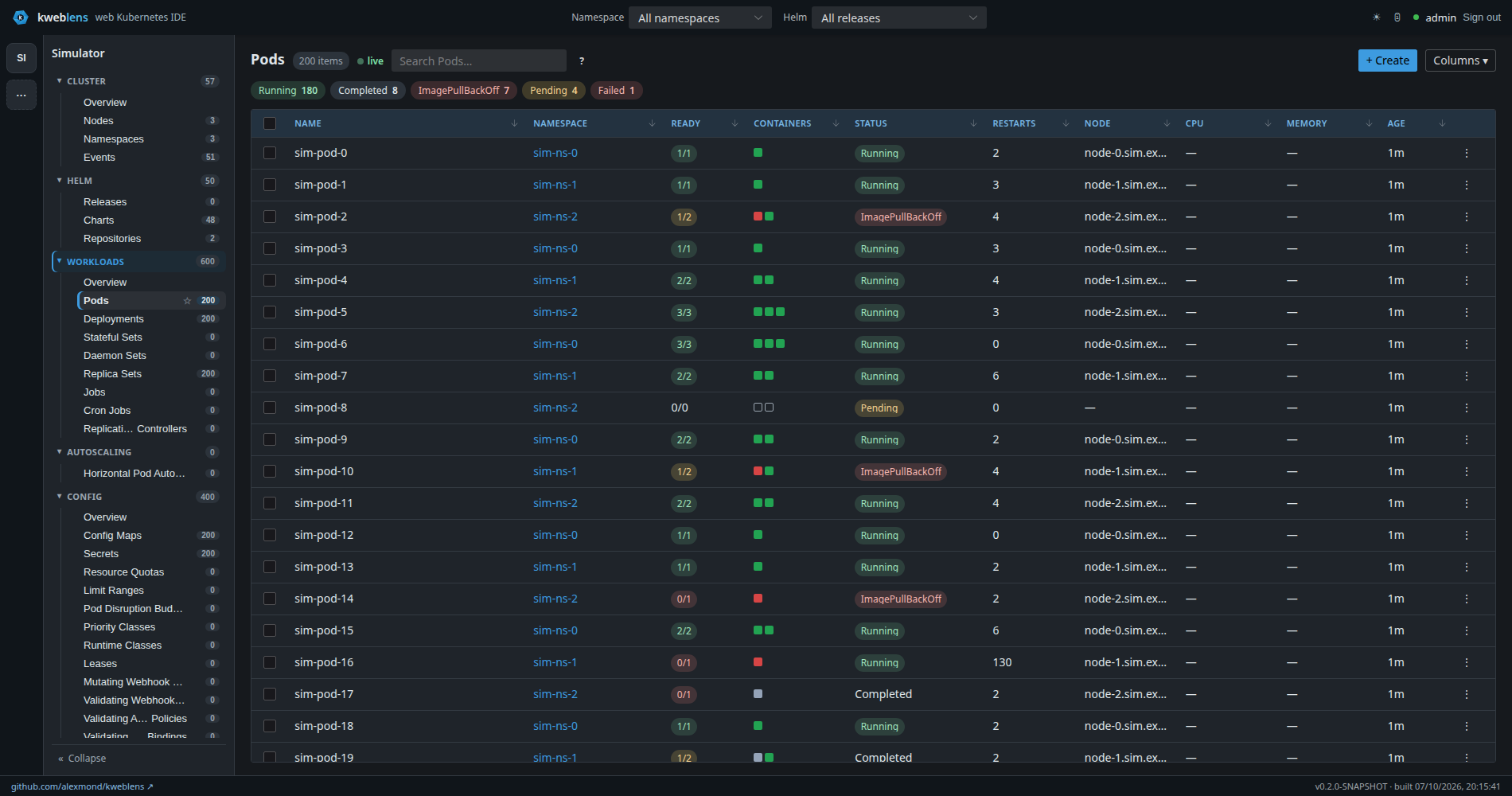
status: vocabulary made clickable — the same words the filter box acceptsThe box in the list header takes a filter expression. Typing a plain word is a case-insensitive
substring search over name, namespace and kind, exactly as it has always been; everything else is
opt-in on a character a substring never contained. The ? button beside the box shows the same
table at any time.
A query is whitespace-separated terms, and every one of them has to match — the same
conjunction kubectl -l a=b,c=d uses. A leading - negates any term.
| Term | Matches |
|---|---|
|
name, namespace or kind contains |
|
everything that does not |
|
both, ANDed |
|
text with a space in it |
|
a regex over name, namespace and kind, case-insensitive and Unicode-aware |
|
one field only — also |
|
a field matched by regex |
|
the state an overview card counts — the whole word, not part of it |
|
states matched loosely — every kind of backoff |
|
label equality |
|
the label differs or the object has no |
|
set membership — also |
|
the label exists; |
Label matching is Kubernetes' own, taken from apimachinery’s `labels.Requirement.Matches,
including the part that surprises people: != and notin match an object that does not carry the
key at all. Label values compare exactly, case and all, like kubectl -l; only the free-text
matching is case-insensitive.
A /regex/ belongs to the engine that runs it — V8 in the browser, java.util.regex in the
terminal — and the browser compiles it in Unicode mode (iu). That is what makes \p{L} the
letter class rather than a search for the text p{L}, which is what it silently was until
#410; it also makes . one whole character and
folds case over the whole of Unicode, both of which the terminal always did. The cost is that a
pattern leaning on JavaScript’s old web-compatibility rule — an escape the engine does not define,
such as \- for a plain - — is now an error naming the reason instead of a different
pattern. Refused means refused: the query is not applied and every row stays on screen.
Three deliberate differences from kubectl -l, stated in the help popover as well as here:
-
Kubernetes writes label presence as a bare
partitionand absence as!partition. Here they arelabel:partitionand-label:partition, because a bare word is a text search and has to stay one. -
The numeric requirements
key>1/key<1are not supported, and a term shaped like one is an error rather than a silent substring search. -
Arbitrary field selectors (
--field-selector status.phase=Running) are not implemented — no JSON path is addressable.status:is the one field selector there is, and it selects on kweblens' own state vocabulary rather than onstatus.phase.
3.1. status: — one vocabulary for the cards and the lists
status: matches the state the server computed for the object, which is the same value the
category overview cards count. A card reading 80 Running · 3 Pending · 2 Failed and
the rows status:Pending selects are therefore the same objects, not two similar answers.
That is the reason the state is computed on the server and shipped on the row rather than derived in the browser. For several kinds the browser could not derive it at all: a Service is broken when nothing is behind it, which lives in the Endpoints object; a claim is "Nearly full" only according to the metrics backend; a ConfigMap is "Not referenced" only after scanning the namespace’s pods, service accounts and ingresses. Those three are shipped too — the list request opens the same second collection the card used, once, before it walks the rows (see Health and diagnostics for what each costs). And a rule transcribed into two languages drifts without either side going quiet — both keep answering, just differently.
Two consequences worth stating:
-
The match is on the whole label, case-insensitively. Every other term is a substring search, because half a pod name is a useful question. Half a state is not: as a substring,
Completewould takeCompletedwith it, and the card’s number and the list’s rows would stop agreeing without anything on screen saying so. Use a regex —status:/backoff/— when the loose question is the one you meant, and quote a state that contains a space:status:"No endpoints". -
A kind kweblens has no verdict for carries no state, and no
status:term selects it. That is the absence of a claim rather than a claim of health. Today the states are computed for the workload kinds — Pods, Deployments, StatefulSets, ReplicaSets, DaemonSets, Jobs and CronJobs — for the cluster-scoped Nodes and Namespaces, and for the four kinds whose verdict needs a second collection: Services (Serving,No endpoints,Not ready), PersistentVolumeClaims (Bound,Nearly full, and the other binding phases), ConfigMaps and Secrets (Referenced,Not referenced, andCluster-managedfor the ones the cluster owns). Node states are kubectl’s own spelling, sostatus:Readydoes not select a cordoned node: that one is counted asstatus:Ready,SchedulingDisabled, on its own line of the card.
A query that does not parse is not applied, and the header says why — an invalid regex, an
unterminated quote, a missing label key. Every row stays on screen and the count goes back to the
plain total, because "nothing matched" and "your pattern is broken" are different claims and only
one of them is true. The parser is kweblens-ui/src/objectFilter.ts; its grammar and every
malformed input are pinned by objectFilter.test.ts.
The filter is client-side, and that is a decision rather than an accident. A filter evaluated over a truncated page reports "no matches" for an object that exists, which is the failure the Performance and scale page’s paging question was closed to avoid. The list endpoint returns the whole collection — chunked internally, which the client never sees and which never truncates — so a filter that runs in the browser sees every object and cannot give that answer.
4. What a list row shows
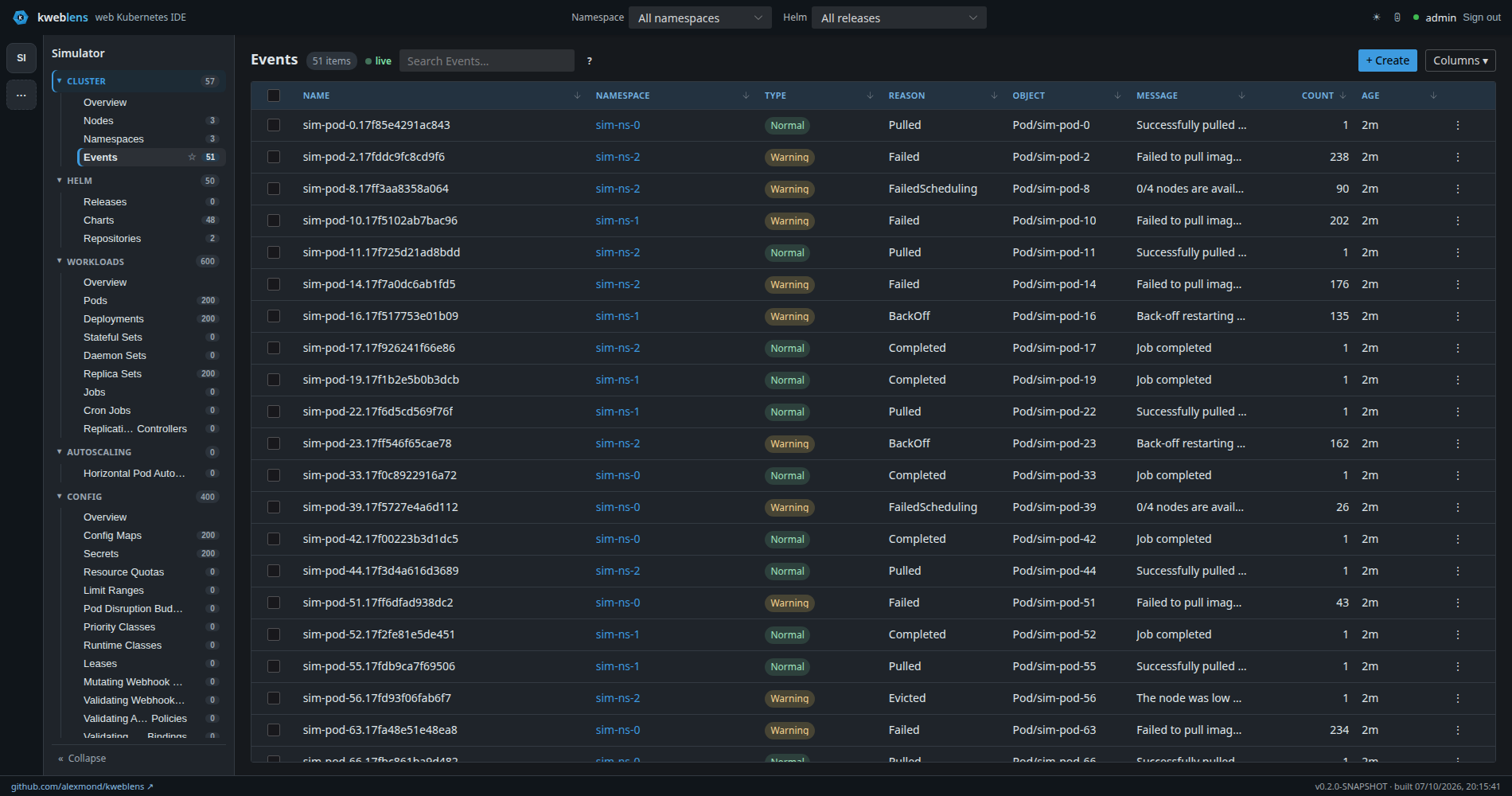
Normal and Warning wear the same green/amber vocabulary the status column uses, so one glance reads the same way on every tableEvery list has the same frame — a selection checkbox, Name, Namespace (for namespaced kinds;
clicking it sets the namespace filter), the kind’s own columns, Age, and a ⋮ menu — with the
middle columns varying by kind. ConfigMaps add a Keys count; Secrets add Type and Keys.
Custom resources get the CRD’s printer columns, taking the CRD’s stored version and dropping the
wide-only ones, which is the same view kubectl get gives you by default.
5. Live updates
Lists are live. GET …/resources/{resourceId}/objects fetches the current objects and
…/objects/watch streams Kubernetes watch events over SSE, so rows appear, change and disappear
without a refresh.
Two properties of that stream are worth knowing:
-
Events are batched per animation frame. A burst of watch events on a large list is coalesced into at most one update per frame, which is what stops a busy namespace freezing the tab. This is guarded by a test, not just by intent.
-
Every stream carries a keepalive. An
SseEmitteronly learns its client is gone from a failed write, and a quiet cluster produces no writes — so a departed subscriber would otherwise hold a cluster-side watch open indefinitely (measured at over five minutes). A:keepalivecomment every 15 seconds fails fast on a closed socket, completes the emitter and closes the watch.
6. A list row is not the whole object
This is the one place where what you see in a list is deliberately less than what exists, and it is worth being precise about, because it is not redaction.
List payloads pass through a projection at the web boundary that does two things:
-
managedFieldsis stripped from every object. It is per-manager field-ownership bookkeeping, nothing in the UI renders it, and it is 37–48% of a real Pods or ReplicaSets payload. -
ConfigMap and Secret values are dropped, keys kept.
data,stringDataandbinaryDataarrive as their keys mapped to JSONnull. The list only ever shows a key count, and that data is 96–99% of those payloads.
Across six kinds on a real cluster this took a listing from 9.85 MB to 1.28 MB, 98.8% of the saving on Secrets alone.
The strip is restricted to ConfigMap and Secret on purpose — on a custom resource data can be
the entire spec, and a CRD’s printer columns are free to render it.
|
A |
Both the objects endpoint and the objects/watch stream go through the same projection —
separate code paths, one rule.
6.1. One thing a row has that the cluster does not
The same projection adds a field: kweblensState, {"label": …, "tone": …} — the object’s
state in the vocabulary described under status:, computed by the same call
the overview cards tally their numbers from. It is what lets a filter in the browser select
exactly the objects a card counted. Kinds with no verdict get no field at all, and it is added in
the projection rather than in either controller for the same reason the strips are: the list and
the watch are separate code paths feeding one table, and a field added to only one of them would
be erased by the first watch event to arrive.
6.2. The drawer still shows every value
Opening a row’s detail drawer refetches the full object from GET …/object whenever the row
it was given contains a null inside one of those fields. The predicate reads the row rather
than consulting a hard-coded list of kinds, deliberately: a kind list in the browser would be a
second copy of the server’s rule, and the copy that goes stale silently.
So the projection bounds what a listing pushes into the browser. It does not hide anything from you. Per the identity model, an operator may read any Secret the underlying credentials can reach, and the drawer shows the real values — see Security and identity.
7. Global search
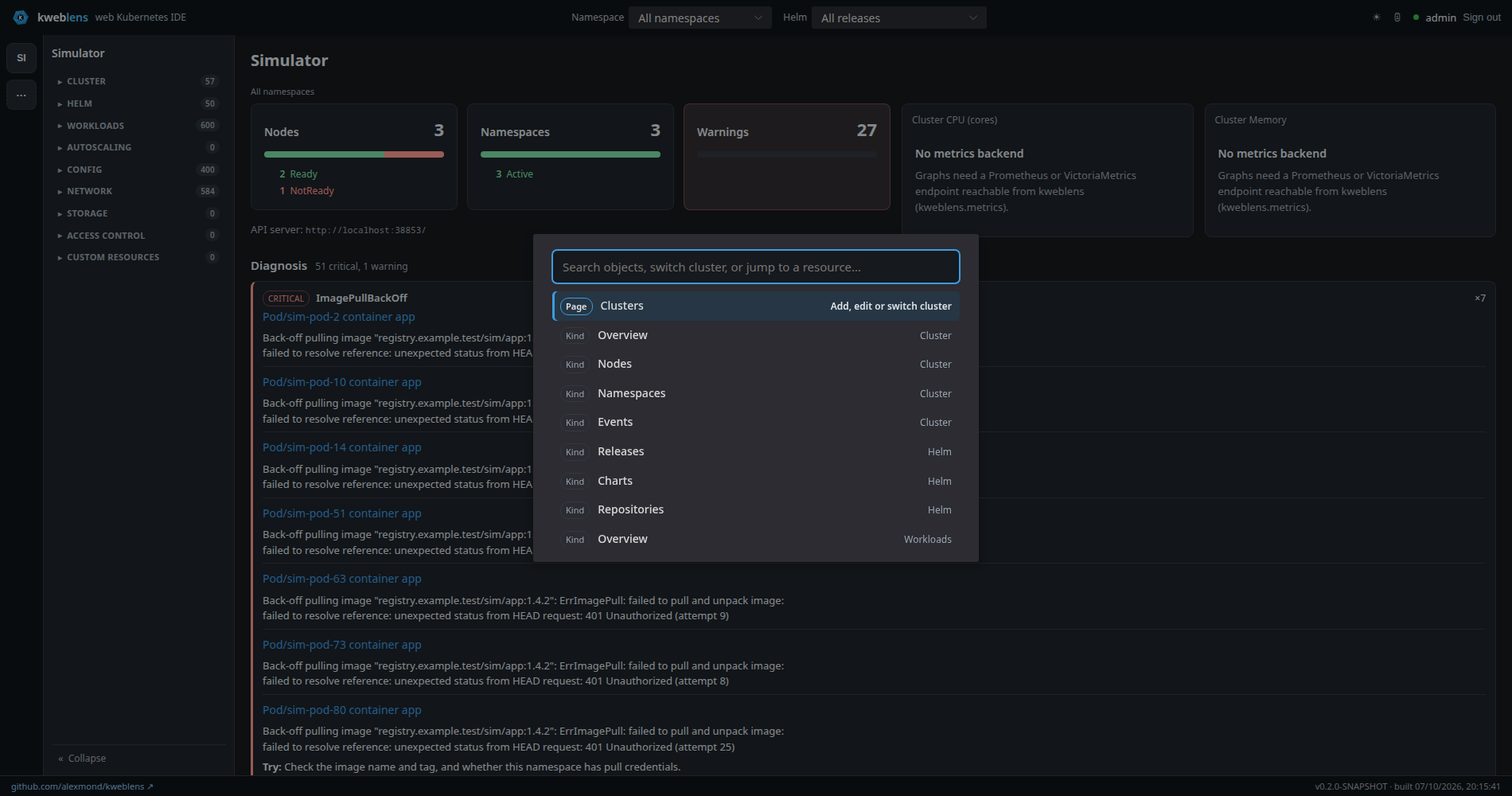
The command palette (Ctrl/⌘-K) is both the navigation jump — switch cluster, jump to a kind
— and the global object search. Typing at least two characters queries
GET /api/v1/clusters/{id}/search?q=…, debounced, and merges matching objects into the results
alongside the navigation entries.
The search spans 13 kinds rather than every kind in the catalog, querying up to 8 at a time: Deployments, StatefulSets, DaemonSets, CronJobs, Services, Ingresses, ConfigMaps, Secrets, PersistentVolumeClaims, Namespaces, Nodes, and — ranked below those — Pods and Jobs. ReplicaSets are deliberately excluded: they are generated, numerous, and almost never what someone is looking for by name.
Ranking prefers a prefix match over a word-boundary match over a substring, prefers shorter names, and gives a bonus to the eleven primary kinds — so searching a Deployment’s name finds the Deployment before the pods it generated.
Results are capped (20 by default, 100 maximum). Crucially, a kind that was not searched is reported rather than silently omitted: if a query is superseded by a newer one, or a kind is skipped, the response names it and the reason. An incomplete search says it is incomplete.
Search respects the namespace filter.
8. The detail drawer
Clicking a row opens a drawer served by
GET /api/v1/clusters/{id}/detail/{resourceId}/{namespace}/{name}, which returns the object plus
its resolved relations. The joins are done server-side, in one request — the alternative was
N extra requests per drawer open from the browser, and the same payload also serves other
consumers.
Alongside the overview it offers the object’s YAML (see Editing and applying), its events, and — for pods — logs, a shell, and optionally files.
8.1. The twelve relation sections
Sections appear only where they apply, so you will never see all twelve at once:
| Section | Shown for, and what it answers |
|---|---|
Endpoints |
A Service — its backing addresses, ready and not-ready distinguished |
Routed By |
A Service — the Ingresses that route traffic to it |
Selected Pods |
Anything with a pod selector — the pods that selector actually matches |
Mounted By |
A ConfigMap, Secret or PersistentVolumeClaim — which pods mount it |
Replica Sets |
A Deployment — its ReplicaSets, which is also its rollout history |
Autoscaled By |
A Deployment, StatefulSet, ReplicaSet or ReplicationController — the HPAs targeting it |
Disruption Budgets |
A Pod, Deployment, StatefulSet, DaemonSet or ReplicaSet — the PDBs covering it |
Bound Volume |
A PersistentVolumeClaim — the PersistentVolume it is bound to |
Bound Claim |
A PersistentVolume — the claim bound to it |
Service Account |
A Pod — the ServiceAccount it runs as |
Granted By |
A ServiceAccount — the RoleBindings and ClusterRoleBindings that grant it permissions |
Owned By |
Anything with owner references — the owner chain upwards, to a depth of three |
Three of them — Endpoints, Selected Pods and Mounted By — get kind-specific columns; the rest render as name/kind/namespace tables.
Each section is bounded at 100 items, and says so when it truncates rather than quietly
showing a prefix: Showing the first N only — there are more. An empty section renders the
literal word None., and a section kweblens is not permitted to read says that too — a
permission error is reported, not folded into an empty list.
|
The drawer requests relations for namespaced objects only, because the detail endpoint takes the namespace in its path. Bound Claim is therefore reachable through the API but never requested by the current UI, since PersistentVolumes are cluster-scoped. |
8.2. What relations deliberately do not answer
Relation carries objects, so a join whose interesting answer is that the referenced object is
missing cannot be expressed: an absent reference could only be dropped (claiming a
completeness that is false) or fabricated (claiming an existence that is false). Ingress TLS
secret expiry is the usual request and is not implemented for that reason.
Requests-and-limits versus actual usage is not a relation either — that is the metrics path, see Metrics.
9. Limits
-
No server-side pagination. Very large clusters will be slow to list. See Performance and scale for what has been measured and where the limits bite.
-
Not RBAC-aware. The nav offers every kind in the catalog whether or not the credentials kweblens holds can list it; a kind it cannot read fails when opened rather than being greyed out.