Editing and applying
kweblens edits Kubernetes objects as YAML, with completion and validation driven by the cluster’s own schema, and it can ask the API server what a manifest would become before you write it. This page is precise about which parts of that are a real server round-trip and which are not, because the difference matters when something goes wrong.
1. Opening the editor
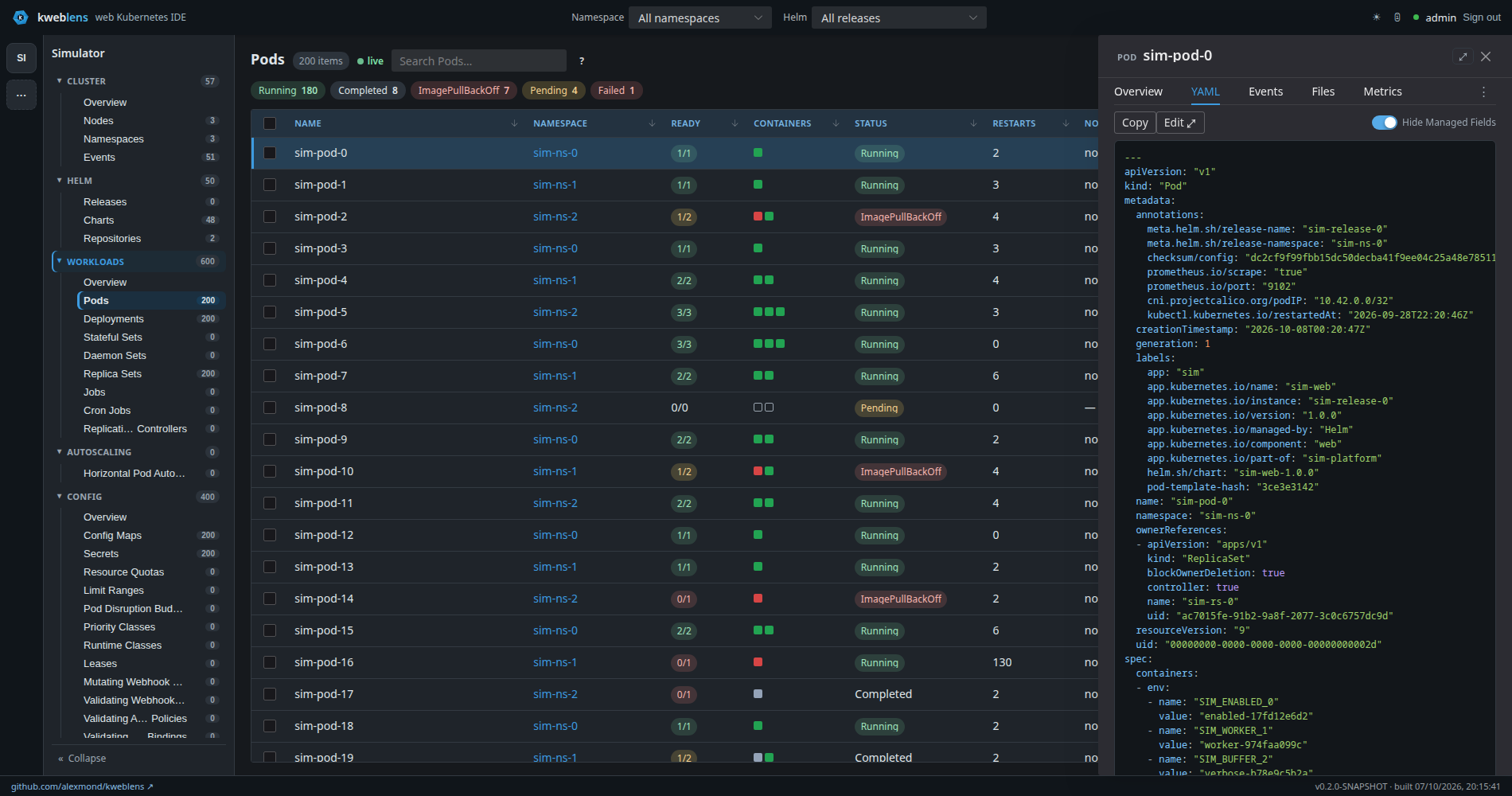
Hide Managed Fields is on by default, so the manifest reads as something a person wroteThe detail drawer’s YAML tab shows the object read-only, with Copy and a
Hide Managed Fields switch that removes the verbose metadata.managedFields block from the
view.
Edit ⤢ opens the pop-out editor. When you are not signed in the same button reads View ⤢ and
opens a read-only viewer: the Editor tab is not editable, and the Form, Warnings, Review Changes
tabs and the Apply button are hidden entirely. There is no editing surface that only looks
disabled.
A row’s kebab menu offers Edit as a shortcut, which opens the drawer with the editor already up.
2. The four tabs
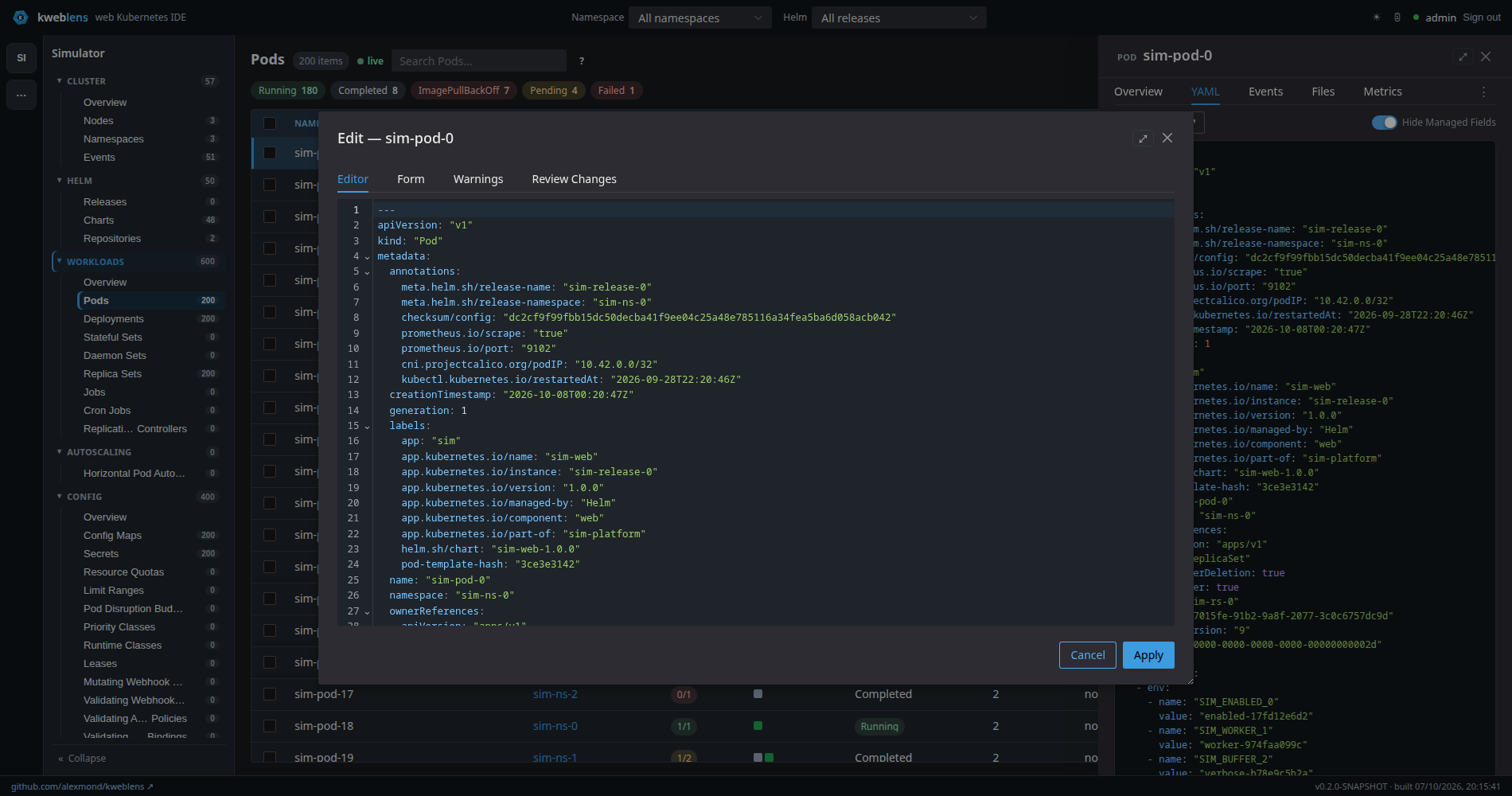
Apply is the only control that writes2.1. Editor
CodeMirror 6. When kweblens has a schema for the kind, the plain YAML language mode is replaced by a schema-aware one that supplies completion, hover and linting from that schema.
The schema is the cluster’s own. GET /api/v1/clusters/{id}/schema?resource={kind} reads
/openapi/v3/… off the API server for the kind’s group-version, rewrites the $ref locations
into draft-07 form, and returns the target kind inlined at the root with every other schema in
that group-version under definitions.
Two consequences of it being the cluster’s schema rather than a bundled one:
-
CRDs get real completion, because their schemas come from the same endpoint as built-in kinds.
-
What you get matches the API server version you are actually talking to.
The schema is cached per cluster and group-version with a 10-minute TTL on a monotonic clock, and is invalidated for a cluster when that cluster’s client is replaced or removed — so re-pointing a cluster id cannot leave the editor completing against the previous API server.
Fetching the schema is best-effort. If it fails, you get a plain YAML editor rather than an error.
2.2. Form
A structured editor generated from the same schema. The YAML draft stays the single source of truth: the form parses the draft, edits nodes in place and writes the document back, so ordering, comments and any fields the form does not model survive a round trip.
It renders:
-
Labels and Annotations as key/value editors
-
a schema-driven section for the kind’s own fields
-
Data for ConfigMaps and Secrets — for Secrets headed
Data — values shown decoded, decoded on read and re-encoded on write
Field widgets come from the schema: booleans get a switch, integers a number input, enums a select
populated from the schema’s own enum, everything else a text input.
Fields the API server will not let you change are shown read-only with the reason, rather than
accepting an edit that would be rejected — a workload’s pod selector and a Service’s clusterIP
are the common cases.
For a set of well-known workload and networking kinds the fields are a curated list; for anything
else the form falls back to discovering scalar fields directly under spec, capped at 30. With no
schema at all, the Form tab has no fields to offer.
If the draft is not parseable the tab says so plainly — Can’t parse the YAML — fix it in the
Editor tab to use the form. — instead of silently showing an empty form.
2.3. Warnings
The schema linter’s findings, listed as Line N plus the message. The tab label carries a count
badge, which turns red when any finding is an error rather than a warning. Clicking a finding
jumps to the Editor tab.
The empty state is No schema warnings.
|
Schema errors do not block Apply. With errors present the footer shows
|
2.4. Review Changes — two different questions
This tab shows two diffs side by side, because "is my edit what I meant" and "will the cluster agree" are different questions and both are worth asking.
Left — Your edit. Caption: Edited YAML against what was loaded. This is what you changed.
A diff of the draft against the text the editor opened with. This is entirely local; it never
touches the cluster.
Right — What the cluster would store. A real request:
POST /api/v1/clusters/{id}/apply/dry-run, which the server issues as
dryRun().forceConflicts().serverSideApply() — dryRun=All, so the manifest goes through the
whole chain and the object that would have been persisted is returned and then discarded.
Three things live in the gap between the two diffs, and none of them is visible from the left one:
-
Defaulting — the fields the API server fills in that nobody typed
-
Another manager’s fields — which
forceConflicts()silently takes over -
Admission — a validating webhook that rejects this, a quota that blocks it, or a mutating webhook that rewrites it into something other than what you typed
Both sides of the right-hand diff are normalised the same way before comparison, so the diff is a
diff rather than a wall of managedFields.
The preview is fetched when you open the tab, and re-fetched when the draft has moved on since the
last answer — not on every keystroke, because it is a real round-trip. A Re-check button forces
it. An answer that arrives after you have typed further is discarded rather than shown against the
wrong draft.
The caption tells you which of five states you are in:
| State | Caption |
|---|---|
Not yet asked |
|
Asking |
|
Answered, differs |
|
Answered, identical |
|
Refused |
|
Could not ask |
|
2.4.1. A refusal is a result, not an error
If a webhook says no, that is the feature working. kweblens classifies HTTP 400, 403, 409 and 422 from the dry run as the cluster considered this and said no, and renders the API server’s own message in the space the diff would have occupied — not as a toast that scrolls away.
401 is deliberately not a refusal: it means the request never authenticated, so the cluster
has no opinion yet. Neither is a 502, which is a failed connection. Those land in the
Could not ask state, which says out loud that the manifest is unchecked.
3. Applying
POST /api/v1/clusters/{id}/apply, body is the manifest as application/yaml. The server runs:
client.resource(forApply(yaml)).forceConflicts().serverSideApply()forApply strips the server-managed metadata that would make an edited-then-resubmitted manifest
fail to apply cleanly: managedFields, resourceVersion, uid, creationTimestamp and
generation. Crucially the dry run goes through the same normalisation — a preview made of
different bytes describes a different request, and a preview that is wrong in one field is worse
than no preview, because it would be believed.
Every apply is recorded in the audit trail. The dry run is not audited: the trail records what was changed, and nothing was.
|
What the preview does not cover
The apply that actually writes is The preview is a separate request you can choose to run. Nothing forces you to open the Review Changes tab before pressing Apply, and nothing blocks Apply on a refused preview or on schema errors. "Suggest → preview → confirm → apply" is available on this surface, not enforced by it. Note also |
4. Creating
There is no separate create endpoint — create is apply. The + Create button on a resource
list opens an editor on a blank manifest and posts it to the same endpoint; server-side apply
creates the object if it does not exist. The only difference is that the outcome is reported as
created.
5. Deleting
Row actions on a resource list:
-
Delete—POST …/resources/{resourceId}/{namespace}/{name}/delete, a normal graceful delete. -
Force Delete— the same endpoint with?force=true, which deletes immediately with a zero grace period and cascading enabled. For stuck resources; it skips graceful termination.
Both go through a confirmation dialog naming the kind and object, and both are audited — force-delete under its own action name, so the trail distinguishes them.
For cluster-scoped kinds the namespace path segment is _.
5.1. Bulk delete
Selecting rows reveals a bar showing N selected with Delete and Clear. One confirmation
covers the whole set, then kweblens deletes them one at a time through the same per-object
endpoint — there is no server-side bulk delete, so each object gets its own audit entry.
Partial failure is reported honestly rather than as a single red banner: you get
Deleted X of Y …; N failed, with the first few reasons named and the rest counted.
The loop distinguishes two kinds of failure:
-
A session failure (your login expired) stops the run, and the message says so — the remaining objects were not tried.
-
A cluster refusal on one object, such as an RBAC 403, counts that row as failed and the loop continues. One object you may not delete does not abandon the others.
6. The JSON-merge-patch endpoint
PATCH /api/v1/clusters/{id}/patch?resource=&namespace=&name=, accepting
application/merge-patch+json. The body is an RFC 7386 JSON Merge Patch: fields present in the
patch are set, and a key mapped to null deletes it. It is audited like any other write.
It exists for targeted edits — labels, annotations, ConfigMap or Secret data — without resubmitting the whole object.
|
Two honest caveats. The current UI does not use this endpoint — the Form tab writes back into the YAML draft and goes out through the single apply path — so today it is an API-only surface. And it has no dry-run counterpart: there is no preview endpoint for a merge patch, so a patch is sent unchecked. |
7. Other writes, and which are previewed
Beyond the editor, the row menu offers Scale…, Restart, Rollback, Suspend/Resume,
Trigger (CronJobs), and for nodes Cordon, Uncordon and Drain. All are POSTs under the same
resource-action path, all require the admin login, all are audited, and none of them is
dry-run-previewed — they are direct writes behind a confirmation.
The one place a preview is attached to a non-YAML action is remediation, where two of the four
proposed actions are patches and get a real dryRun=All, and the other two return an explicit
"not checked" naming the reason. See Health and diagnostics.
8. Related
-
Browsing resources — where the editor is opened from, and why a list row is not the whole object
-
Security and identity — every write here requires the admin login, and none of it is RBAC-aware
-
REST API — the endpoints on this page in their wider context