Helm releases
kweblens manages Helm releases from the browser: browse charts, install them, upgrade, roll back, uninstall, read a release’s stored values and rendered resources, and keep a library of reusable values files.
1. No helm binary
The Helm surface is built on jhelm, the sibling
Helm-in-Java library, pinned at version 1.5.0. kweblens shells out to nothing: there is no helm
executable to install in the image, nothing to keep on PATH, and no subprocess to sandbox.
kweblens is also a deliberate dogfood of jhelm — it consumes jhelm-kube (which brings
jhelm-core) and jhelm-rest-starter, and drives them the way any other application would.
Cluster access is shared rather than duplicated: jhelm is configured to build no ambient Kubernetes client, and kweblens hands it one per cluster from its own registry. So Helm operations run with exactly the credentials the rest of kweblens uses, against exactly the cluster you have selected.
2. The three panes
A Helm section in the left navigation, placed just after Cluster, with three views:
2.1. Releases
Every release in the selected namespace, or across all namespaces. Columns: Name, Namespace, Chart, Source, Revision, Version, App Version, Status and Updated.
Source distinguishes releases kweblens installed (kweblens) from ones it did not
(external) — kweblens stamps a label on what it installs and upgrades, so it can tell you which
releases it is responsible for without claiming ownership of the rest.
Version carries an update hint. kweblens checks each release’s chart against every repository
jhelm knows about and, when a newer version exists, shows ↑ <version> with the repository it came
from. The row menu then offers a pre-filled Update → <version> alongside the plain Upgrade. The
comparison is a lenient SemVer one — a leading v is ignored, and a pre-release suffix sorts older
than the release it precedes.
The hint is computed for the releases list and for a single release’s status; the History modal does not carry it.
The row menu also gives Resources, Values, History, Upgrade, Rollback (disabled at
revision 1, and defaulting to the previous revision) and Uninstall.
2.2. Charts
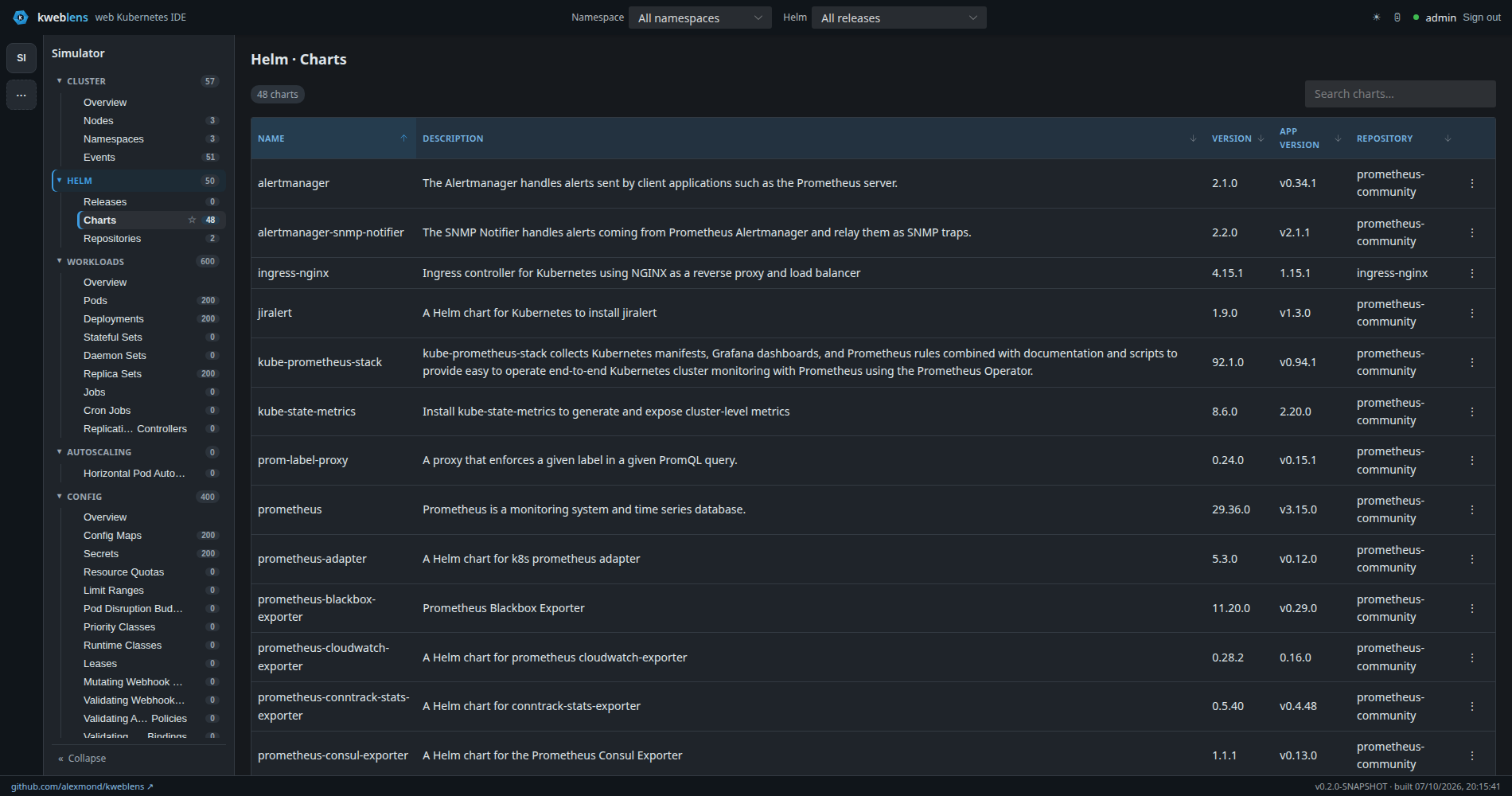
helm binary on the boxThe charts available from the configured repositories, searchable. Install opens the install
dialog.
The chart index is fetched from each repository’s index.yaml, cached, and refreshed in the
background rather than on the request path.
2.3. Repositories
The repository list, with Add repository, and per row Edit, Refresh and Remove. The add
form appears only when you are signed in.
Repositories added here are persisted by jhelm under kweblens’s own data directory — never the
operator’s ~/.config/helm. In-cluster that directory is a mounted volume, so the list survives a
restart.
Refresh (POST /api/v1/helm/repos/{name}/refresh) drops the cached chart index for that
repository and re-pulls jhelm’s index. It is a POST, so it requires the admin login in both
security modes, and it is audited.
3. Install, upgrade and rollback — the dry run is mandatory
The action dialog says it plainly at the top: Preview a dry-run first; Apply is enabled once the render succeeds.
That is enforced, not advisory. The footer has Cancel, Preview (dry-run) and the apply button
(Install / Upgrade / Rollback), and the apply button is disabled until a dry run has
returned. You cannot install, upgrade or roll back from this UI without the server having first
rendered the release.
The dry run is a real one — jhelm renders the release through the same action class with dryRun
set, so the chart is fetched, the values merged and the templates rendered without anything being
persisted. What you get back is the rendered manifest, shown in full.
A failure — a chart that will not resolve, values that break a template, a schema violation — surfaces in that same dialog, from the same code path the apply uses.
|
Be clear about what the preview is: the rendered manifest, not a diff. kweblens does not show you the difference between the current release and the proposed one, and it does not summarise the resources that would change. You get the YAML that would be applied, and you read it. |
3.1. Values
Install and upgrade take values as YAML text — there is no --set key=value form. The editor
offers:
-
a saved-values library to load from
-
Load current valueson an upgrade, which pulls the release’s stored configuration into the box -
save as…, to add the current text to the library
Advanced options, collapsed by default: Skip hooks, and for upgrades Force resource updates, a
values strategy (default, reuse previous, reset to chart defaults, or reset-then-reuse),
Max history, and a free-text release description. Install additionally offers
Create namespace if missing.
4. Uninstall is the exception
Uninstall goes from a confirmation dialog straight to the mutation. There is no dry run for
uninstall, and no options — no keep-history, no wait, no timeout, no cascade choice.
That is a real asymmetry with the other three actions, and worth stating rather than glossing: uninstall removes the release’s resources and its history, and the confirmation dialog is the only thing between you and that.
5. Reading a release
Three read-only modals off the release row menu:
-
Resources — the Kubernetes objects the release manages, parsed from its rendered manifest. Clicking a name opens that object in kweblens.
-
Values — the release’s stored configuration (
helm get values), as YAML. Empty user values are reported as chart defaults only rather than as an empty box. -
History — the revision list.
The reverse link exists too: an object installed by Helm shows a Managed By field and a
Helm: <release> badge in its detail drawer, which deep-links back to that release’s resources.
5.1. Scoping the whole UI to a release
The top bar has a Helm filter. Selecting a release scopes every resource list in kweblens to the objects that release manages.
It fails closed. If kweblens cannot list what the release manages, it says so — this is an empty view, not an empty release — rather than showing you an empty list you might read as "the release has nothing in it".
6. The values library
A library of reusable values files, stored as <name>.yaml and shared across clusters.
| Endpoint | Purpose |
|---|---|
|
list the saved names |
|
fetch one, as YAML |
|
save (create or overwrite) |
|
delete |
Names are validated to letters, digits, ., _ and -, up to 64 characters.
Files live under kweblens.helm.values-path, which defaults into the Helm home
(KWEBLENS_HELM_HOME). In-cluster that is a PersistentVolumeClaim, so the library survives a
restart — see Deploying to Kubernetes. With no path configured at all it
falls back to a temporary directory, which does not.
The UI can list, load and save. Delete is API-only — there is no delete control in the values editor today.
7. Configuration
| Property | Default | Effect |
|---|---|---|
|
two seeded |
Repositories seeded into jhelm at startup, and the ones the Charts pane reads. Each is a |
|
|
How long a repository’s chart index is cached. |
|
Helm home |
Where the values library is stored. |
Seeding is idempotent: a repository already known to jhelm is left alone.
|
Two limits of the Charts pane
The Charts pane reads only There is also no authentication for chart repositories: a repository is a name and a URL, with no credential, CA or TLS fields. Private chart repositories are not supported through kweblens’s own configuration. |
8. Security
Helm follows the general rule — in open-mode reads are public and every write requires the admin login — with one deliberate exception.
Values are authenticated even in open-mode, both a release’s stored configuration and the saved values library:
-
GET /api/v1/clusters/{id}/helm/releases/{ns}/{name}/values -
GET /api/v1/helm/valuesand/api/v1/helm/values/**
Helm values commonly carry plaintext secrets and are returned raw, so they are treated as secrets rather than as ordinary reads.
Install, upgrade, rollback, uninstall, values save and delete, and every repository mutation require the login in both modes. All are audited, with the release, chart, version and namespace recorded — except that a dry run is not audited, because nothing changed.
kweblens is the only gate: jhelm’s own access-mode interceptor is deliberately neutralised so there is one security model rather than two disagreeing ones.
9. Not supported
Worth knowing before you look for them:
-
OCI registries. Charts come from classic HTTP repositories serving an
index.yaml. There is nooci://path in kweblens. -
Private repositories — no credentials, as above.
-
helm test,helm lint,helm get manifest/notes/hooks— not exposed. -
--wait,--timeout,--atomic,--devel,--set— values are YAML text only. -
A diff between the current and proposed release — the preview is the rendered manifest alone.
-
Editing a repository is implemented as remove-then-re-add, so it is not atomic.
10. Related
-
Editing and applying — the non-Helm write path, and its own dry-run story
-
Security and identity — why values are always authenticated
-
Deploying to Kubernetes — the volume that makes repositories and the values library persistent